Three swipes, a tidy library
Swipe right to keep, left to delete, tap the heart for the ones worth saving — two minutes a day clears out years of screenshots, bursts and throwaways. No account, no uploads; deletes are always two-step and reversible for 30 days.
One round, three steps
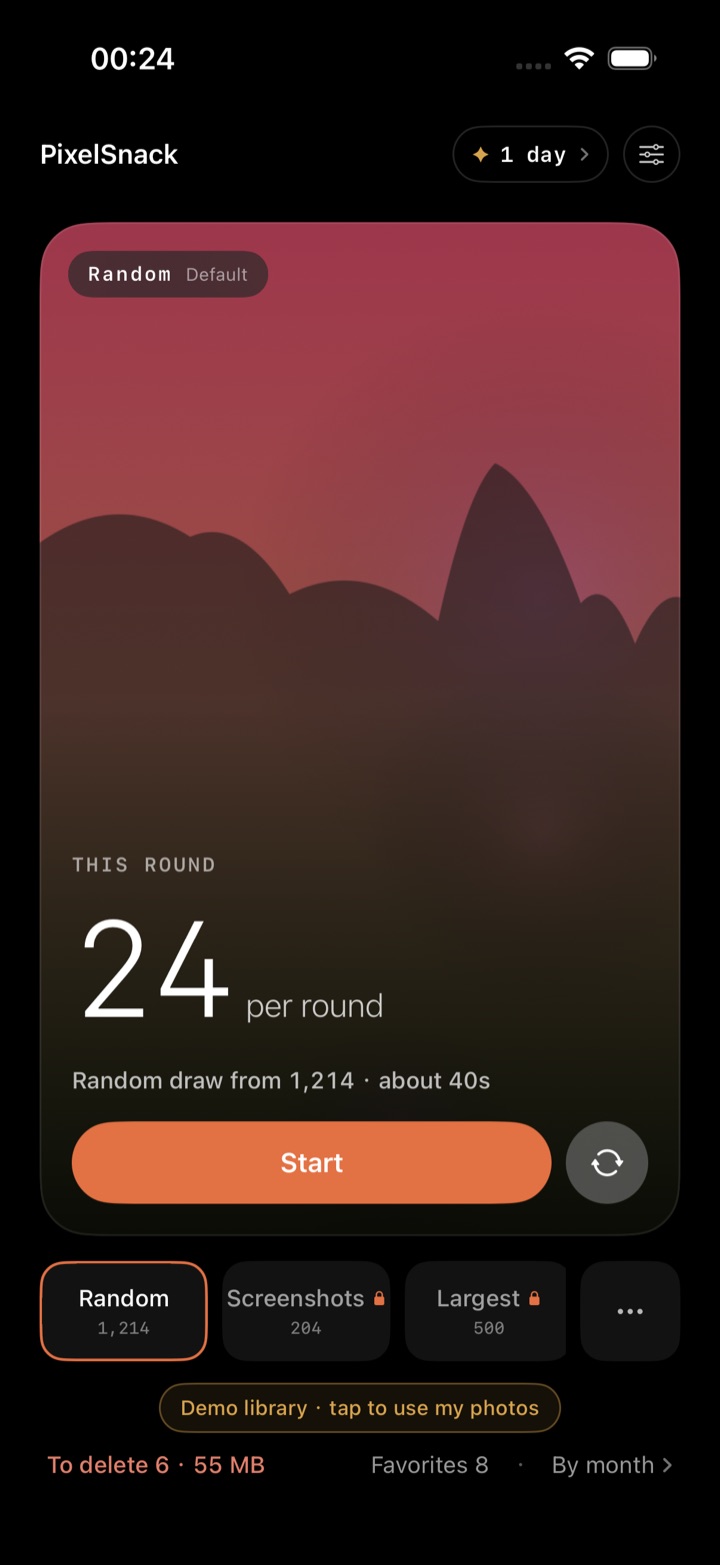
Pick a pool × range
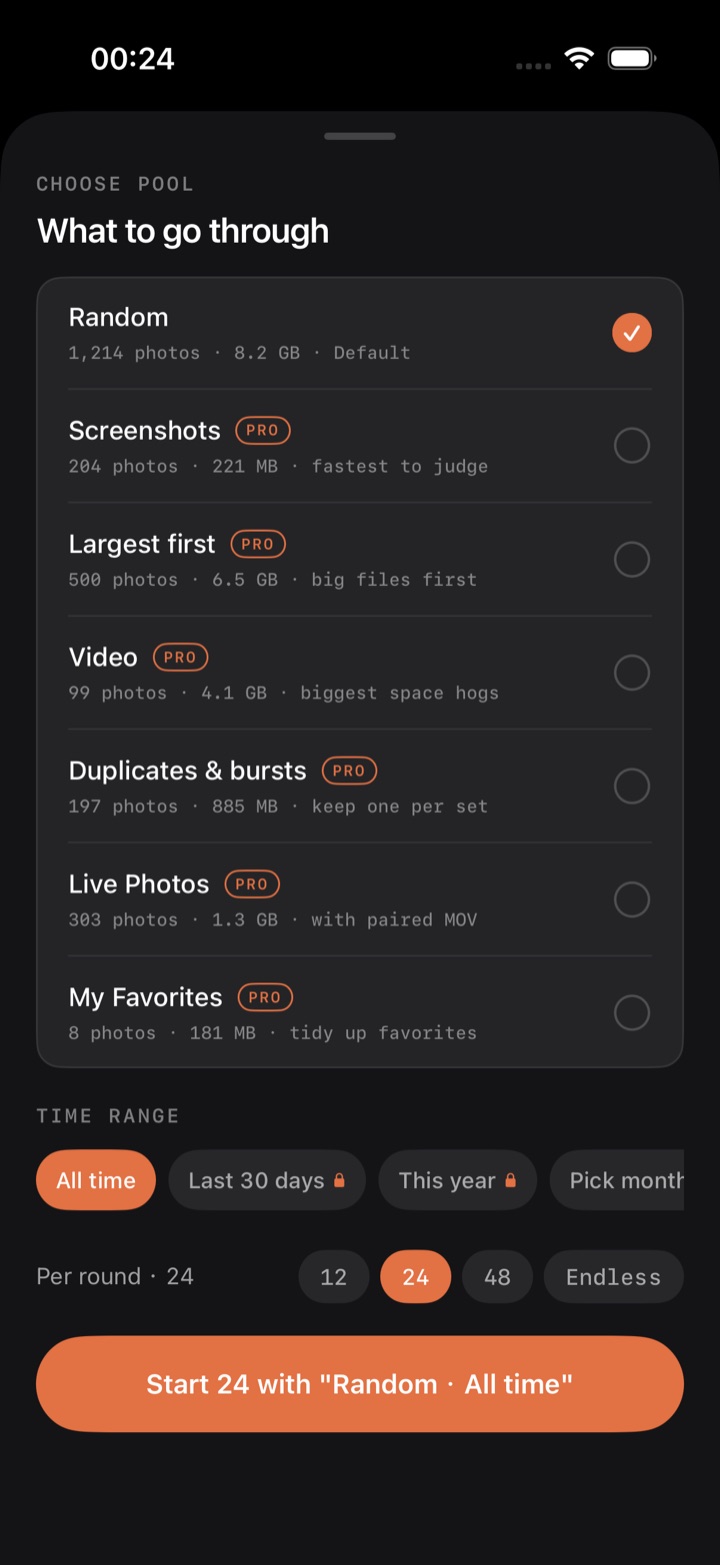
Choose one pool and one time range in the same sheet, then start a round with a single tap.
Swipe to decide
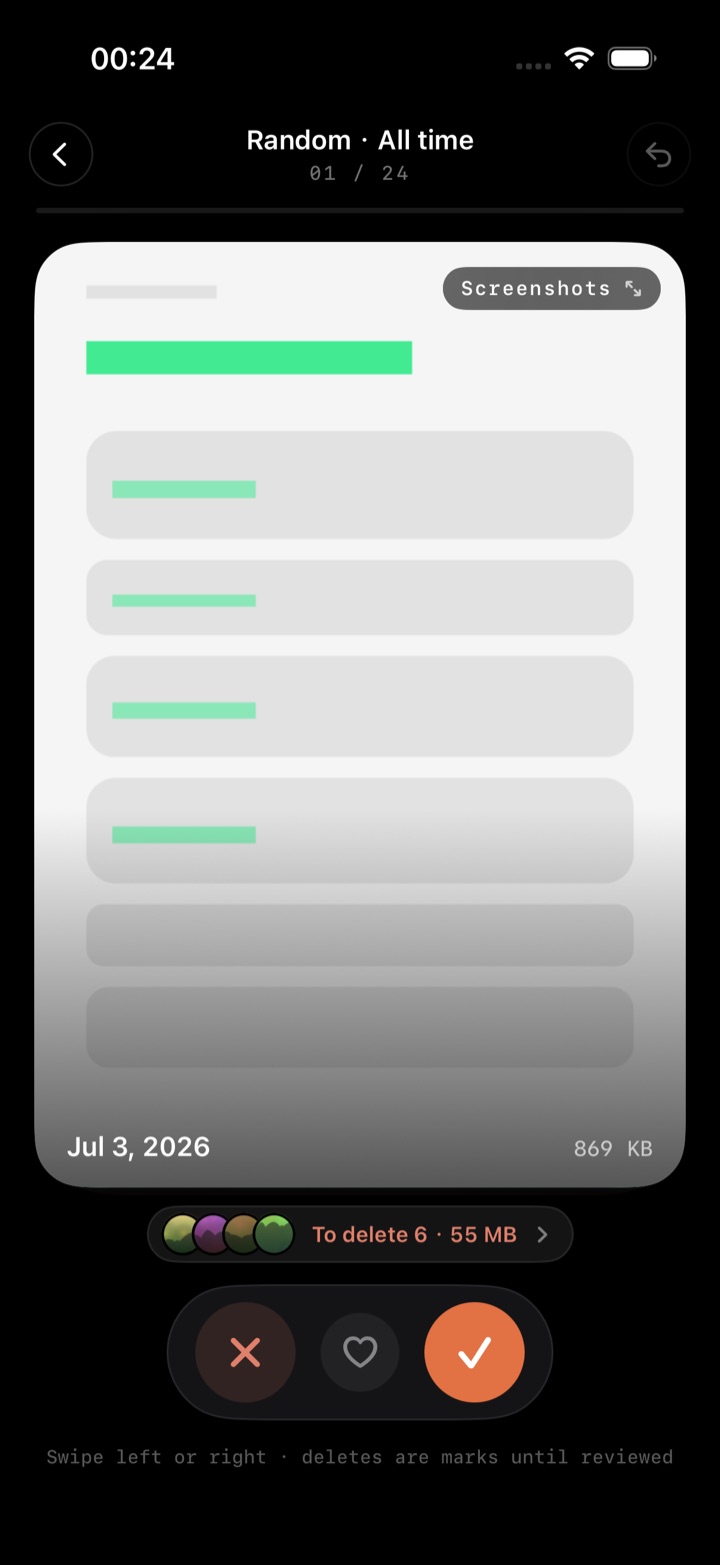
One photo at a time, no agonizing. A directional stamp follows your thumb; the heart in the middle favorites without turning the card.
Review and settle
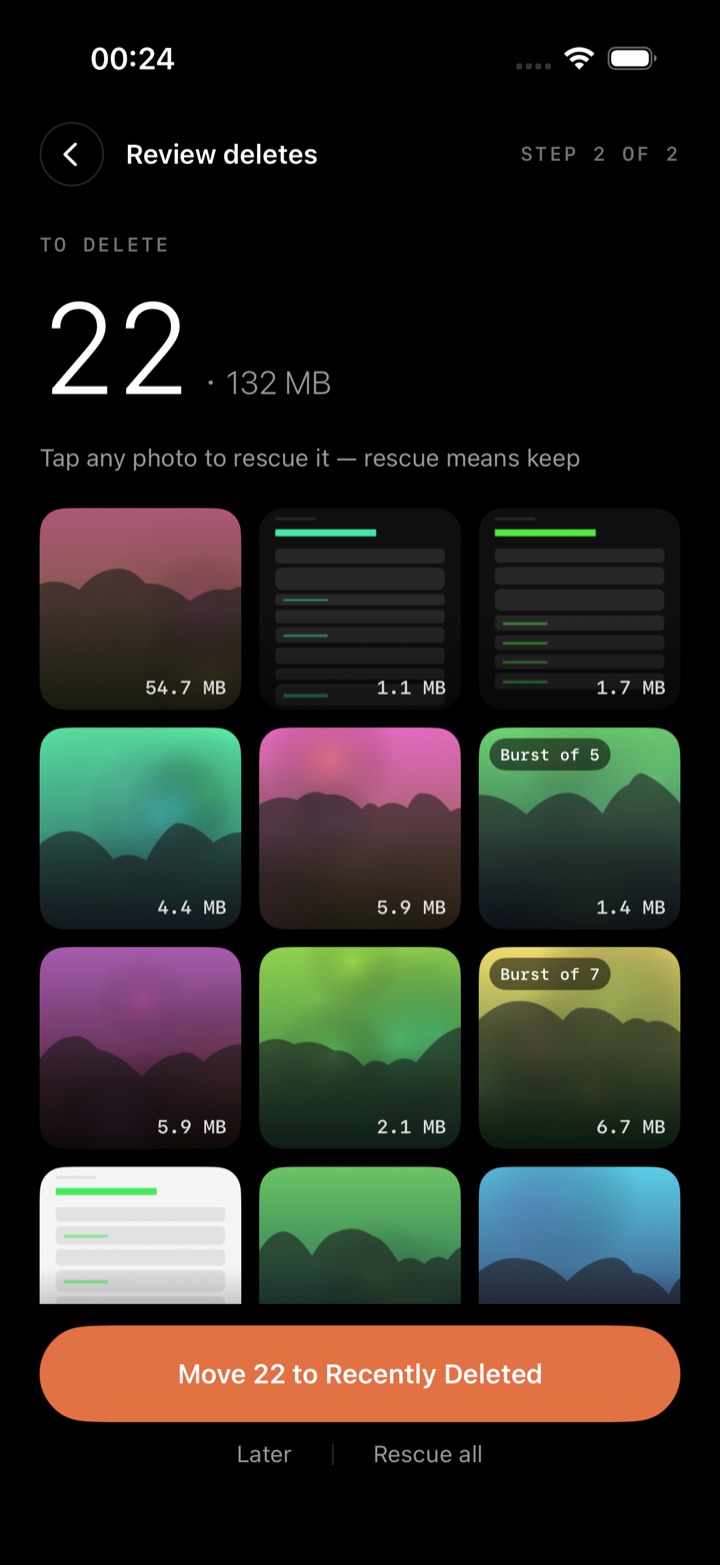
A grid review before anything is deleted — tap any photo to rescue it. Only after you confirm does it reach Recently Deleted.
Fast rounds, and every step is reversible
Right keeps, left deletes; past the threshold the card flies off with a stamp trailing your thumb. Up and down never decide anything, so nothing gets deleted by accident. The heart is a toggle, not a verdict: one tap writes it to Favorites in Photos, another removes it, and the card stays put.
Every decision can be undone (your daily quota comes back too). Quit mid-round and the spot is saved — force-quit the app and you return to the very same photo.
Tap a card to expand it in place: pinch to zoom, double-tap to magnify, hold to play a Live Photo. Videos get a custom player with a draggable scrubber and one-tap pseudo-fullscreen for landscape. Swipe up for camera settings, EXIF and location; swipe down to dismiss.
12 / 24 / 48 per round, or Endless until the pool runs dry — settle manually whenever you like. Shorter rounds are easier to keep up.
A combo counter floats up as you keep deciding, backed by haptics with real weight — a little feel for an otherwise dull chore.
Pool × time range: what to review, and from when
Content and time multiply into one round — a combination like “Screenshots · July 2026” is one tap away.
Seven pools
Random (default) · Screenshots (fastest to judge) · Largest first (start with the big ones) · Videos (the real space hogs) · Duplicates & bursts (keep one per set) · Live Photos (paired MOV included) · My Favorites (tidy the favorites themselves). Each pool shows its live count and size.
Four ranges
All time · last 30 days · this year · a specific month. The month grid is sorted by remaining size so the month worth attacking is obvious; finished months fade out. An empty combination doesn't throw an error — it offers three tappable ways forward.
Deletes are always two-step, with three layers of undo
A left swipe just queues the photo. The queue survives across sessions — leave mid-round and nothing is lost.
A review grid stands between you and deletion; tap any photo to rescue it, and “Rescue all” asks a second time.
Once confirmed, photos land in Recently Deleted and stay recoverable for 30 days. The in-app view logs every batch with a D-N countdown and jumps you to Photos to reclaim the space.
Pick from a burst; tidy your favorites too
iOS only hands apps the cover photo of a burst, so deleting the cover deletes the whole set — we say so plainly and give you a way to pick through it.
Burst cards say “Burst · 12” outright, the size covers the whole set, and both the review grid and the delete count report the real number — you'll never think you deleted just one.
Tap “Pick one” to expand the set, scroll through it and keep the ones you want; the rest join the delete queue — still two-step, still recoverable for 30 days.
Tapping it writes straight to Favorites in Photos, visible in the Photos app too. Unfavoriting on either side syncs to the other — no parallel bookkeeping.
The My Favorites pool reads the whole Favorites album so you can go through it photo by photo: delete what's stale, keep what isn't, and one tap on the heart removes it from Favorites.
Settings can clear every keep/delete decision and return all photos to the queue. Not a single photo is touched, and totals like space freed and your streak are kept.
Stats, achievements and the small stuff
Stats and achievements
Total space freed, a by-month bar chart, day streaks and best combo; four achievements that only count upward — no countdown anxiety.
Instrument-panel design
Pure black, hairline monospaced readouts, a single accent orange — light and dark themes that can follow the system. While sorting, the current photo's blurred tint can fill the background.
Nine languages + demo library
The interface speaks English, 简体中文, 繁體中文, 日本語, 한국어, Deutsch, Español, Français and Português, or follows your system. A locally generated demo library lets you learn the flow before granting photo access.
- No account, no server, no analytics SDK
- Two-step deletes + 30-day system safety net
- Seven pools × four time ranges
- Endless mode · settle whenever
- Step-by-step undo · resume anywhere
- Live Photos / videos / bursts fully supported
- Keep as many from a burst as you want
- Favorites are the system's Favorites
- Light & dark · nine languages
- Free forever: 50 photos a day
No account, no server, no analytics SDK
Every scan and every decision happens on this iPhone. Not one photo leaves the device. Our servers can't leak anything — there are no servers.
Start free, pay once
The free plan sorts 50 photos a day, forever. PixelSnack Pro unlocks unlimited sorting, every pool, picking from bursts and time-range filters.
- Cancel anytime
- Every Pro feature
- About $0.83 a month
- Upgrade to Lifetime for the difference
- Only $5 more than yearly
- Everything, forever, plus regular updates
Prices are shown in your local App Store currency and may vary by region. Subscriptions renew automatically and can be cancelled anytime in Settings.
Frequently asked
Can deleted photos really be recovered?
Yes. Deleting in PixelSnack is always two-step: a round only marks photos, and the system delete is called after you confirm in review. They then sit in Recently Deleted in Photos, restorable as a batch for 30 days.
Are my photos uploaded to your servers?
No. There are no accounts, no servers and no third-party analytics — the app doesn't even ask for network access.
What are the free limits?
50 decisions a day with the Random · All time combination. Review, undo, Recently Deleted and stats all stay available. For light use it's effectively free forever.
Can I still upgrade to Lifetime after subscribing?
Yes, and it's cheaper that way: an active subscriber can upgrade to Lifetime in-app for the discounted difference. Afterwards you can cancel the subscription and keep Pro forever.
Does deleting one burst photo delete the whole set?
It does — that's how iOS works, so we label it clearly: burst cards read “Burst · N”, and both size and delete counts cover the whole set. To keep only some of them, tap “Pick one” below the card; what you select stays and the rest join the delete queue.
Will a huge library (tens of thousands) be slow?
No. The first scan is progressive: the newest few thousand are ready immediately while the rest index in the background. Thumbnails load in tiers and nothing is forced through iCloud.